
A dossier is one body of work, meaning its repositories, tracker, pipelines and
environments, mapped to the connections that reach them. It’s a small JSON file that
says “for card-payments, Jira is project PAY on jira.imagile.dev, the code is
payments-core in Bitbucket, Jenkins builds the payments-core job, and dev runs in
the payments-dev namespace”. It holds no secret, can’t add a host and can’t turn on
writes. It only chooses among connections you already have.
In words: the repository you work in matches the dossier card-payments. The dossier
has one section per area (Jira, Bitbucket, Jenkins, and OpenShift per environment),
and each section picks one of your own connections by its host. The connection holds
the credential and is the only thing that talks to the host.
Why it exists
- One name instead of the same flags on every call. Without a dossier, every
command repeats where the work lives:
toil bitbucket pr list --connection corp-bitbucket --project PAY --repo payments-core. With one, inside a clone ofpayments-coreit’stoil bitbucket pr list, and from anywhere elsetoil bitbucket pr list --dossier card-payments. A value you pass still wins over the dossier’s. - Scoping for agents. An agent working in the repository gets the right project,
repository and connection without being told, and every envelope says where each
value came from (
meta.context). The dossier can’t widen what the agent may do: it holds no credential, can’t point a connection at a new host, and a write on a connection it chose waits until you adopt it (Writes, below). - What Toil UI shows. Toil UI draws one dashboard per dossier: the stories, pull requests, builds and deployments of exactly the areas the dossier names.
- Knowledge that outlives the handover. Repositories, project keys, field ids, boards and namespaces are written down once, in a file a team can review, instead of in one person’s shell history.

Areas, connections and dossiers
Three words, three jobs:
- An area is a kind of service toil speaks to:
jira,bitbucket,jenkins,openshift. Each has its own commands and its own file in this skill. - A connection is one instance of an area, set up by a person in
~/.toil/config.jsonor env vars: its host (baseUrl), its credential (in the OS credential store or an env var, never the file) and whetherwritesare on.toil connections listnames yours. A dossier never holds any of this. - A dossier is one body of work: which connection each area uses for it, and the
keys a call needs there (a project, a repository, a namespace per environment).
Anyone, an agent included, may build one with
toil dossiers.
Credentials stay with connections; knowledge about the work goes in dossiers. That split is why a dossier may be checked into a repository when config may not.
How a call uses a dossier
- Command
toil bitbucket pr listrun in ./payments-core, no flags - Dossier
card-paymentsits repo matches the folder's git remote - Area inputs
project PAYfrom the bitbucket section; a flag would win
repo payments-core - Connection
corp-bitbuckethost bitbucket.imagile.dev selects it; its token comes from your credential store - Request
GET /rest/api/1.0/projects/PAY/repos/payments-core/pull-requeststo https://bitbucket.imagile.dev, reported in meta.context
Every area command runs the same steps, on the CLI and over MCP alike:
- Pick the dossier.
--dossier <name|file>(orTOIL_DOSSIER) if given, else the one whose repository matches the folder you’re in, by its path or its git remote.--cwd <dir>looks from another folder. No match means no dossier, and the command needs its inputs as flags, as it always would. - Pick the section. The area’s section, or
environments.<env>.<area>for the environment: the call’s--envwhen the area has one, else the dossier’senv. - Fill the inputs. Each context input the area declares (
--project,--repo,--owner) resolves in one order: the call’s own value, then the dossier, then the git remote, then the connection’s setting, then the area’s default.toil <area> --helpsays which inputs a dossier can fill (“defaults to your dossier’s …”). - Pick the connection. By the section’s
connectionname, or by itshost, which selects your connection whosebaseUrlhas that host. toil never sends anything to a host because a dossier named it; the host is only a selector. - Send the request with that connection’s credential, and report what was used
in
meta.context.
A real envelope from toil bitbucket pr list, run in a clone of payments-core
(the host doesn’t resolve, which is the point of a placeholder):
"meta": {
  "context": {
    "dossier": { "name": "card-payments", "source": "user", "by": "folder", "match": "remote", "repo": "payments-core" },
    "connection": { "value": "corp-bitbucket", "source": "dossier", "host": "bitbucket.imagile.dev" },
    "inputs": {
      "project": { "value": "PAY", "source": "dossier" },
      "repo": { "value": "payments-core", "source": "dossier" }
    }
  }
}
The request it sent was
GET https://bitbucket.imagile.dev/rest/api/1.0/projects/PAY/repos/payments-core/pull-requests.
A dossier, field by field
~/.toil/dossiers/card-payments.json, as toil dossiers writes it, with notes added:
{
  "name": "card-payments",                      // how you call it: --dossier card-payments
  "description": "Card payments v2: tokenised cards at the edge.",
  "env": "dev",                                 // the default environment; a key of "environments"
  "repos": [                                    // how toil knows you're in this work
    { "name": "payments-core",
      "remotes": ["ssh://git@bitbucket.imagile.dev:7999/pay/payments-core.git"] }
  ],
  "jira": {                                     // one section per area
    "host": "jira.imagile.dev",                 // selects your Jira connection on this host
    "project": "PAY",                           // a context input: fills --project
    "fields": { "storyPoints": "customfield_10002" }   // so --field storyPoints=5 works
  },
  "bitbucket": { "host": "bitbucket.imagile.dev", "project": "PAY", "repo": "payments-core" },
  "jenkins": { "host": "jenkins.imagile.dev", "jobs": ["payments-core"] },   // "jobs": reference data
  "environments": {
    "dev":  { "openshift": { "host": "api.ocp-nonprod.imagile.dev", "namespace": "payments-dev" } },
    "prod": { "openshift": { "host": "api.ocp.imagile.dev", "namespace": "payments-prod" } }
  }
}name: lowercase letters, digits and single hyphens, like a connection’s name.description: for people, and for the dossier list in Toil UI.env: the environment calls use when they don’t pass--env.repos: each has aname, optionalremotesand an optional localpath. A folder matches by path first, then by itsoriginremote, so a fresh clone anywhere still resolves. Remotes are only compared, never contacted, and toil strips any credential from one before storing it.- An area’s section (
jira,bitbucket, …) holds:hostorconnection, never both.hostsuits a shared dossier, since teammates name their connections differently;connectionnames one of yours. With neither, the area’s default connection is used.- the area’s context inputs by name (
project,repo,owner). A value may also be an object of repo name to value, for a dossier with several repositories. fields: friendly names for custom field ids, used by--field. Toil UI also reads the Open Work Item keys there (estimate,estimateUnit,priority,type,team,dueDate,iteration) when it maps the area’s work items, and for a GitHub repository with no board,estimateLabel(the label that holds an estimate,{n}for the number:"estimateLabel": "size/{n}") anditerationDays(how many days each milestone runs as a sprint, as text like every value infields:"iterationDays": "14", not14). Without them a GitHub issue’s milestone is its sprint and apoints: Nlabel its estimate.- anything else (
jobs,boards,deployments, an OpenShiftnamespace) is reference data: kept as written for people, agents, Toil UI andcheck-dossierto read, and never applied to a call. Adding one says so inmeta.warnings.
environments: per environment, sections that replace the area’s own section when that environment applies (--env prod, or the dossier’senv).
Where dossiers live
- Wins a name clashYour own
user~/.toil/dossiers/Written by toil dossiers. Adopted: writes may follow it. - SecondFolders you list
listeddossierPathsA team's repository of dossiers, cloned once.
TOIL_DOSSIER_PATHS - ThirdThis repository
repo.toil/dossiers/*.jsonChecked in with the code. Applies while you're in that repository.
Which one applies to a call?
--dossier <name|file>orTOIL_DOSSIER, when given. A file is the fourth source,file.- Otherwise the one whose repo matches the folder, by path, then by git remote.
- Two different dossiers match:
INVALID_INPUTuntil you pass--dossier. Never a guess.
toil reads dossiers on every area command from three kinds of place, and every
listing says which one each came from (source):
- Your own,
~/.toil/dossiers/<name>.json(user). The commands that build a dossier write here. - Folders you list, in
"dossierPaths"in your config orTOIL_DOSSIER_PATHS(listed): a team repository of dossiers, cloned once. toil reads only folders you list and never searches for others. - The repository you’re in,
.toil/dossiers/*.jsonat its root (repo). A service can carry its own dossier.
A file passed by path (--dossier ./card-payments.json) is a fourth, file.
Same name in two places: your own wins, then a listed folder, then the
repository, so you can override a teammate’s copy without editing it.
toil dossiers list shows the one left out under shadowedBy, and the call warns.
Two different dossiers that both match the folder fail with INVALID_INPUT until
you pass --dossier. toil never guesses, and never picks the one you used last.
Create, check, use, share
Create
On the command line, or let an agent run the same commands:
toil repos scan
toil dossiers init card-payments --description "Card payments v2"
toil dossiers add-repo card-payments ./payments-core
toil dossiers link card-payments jira --host jira.imagile.dev --set project=PAY
toil dossiers link card-payments bitbucket --host bitbucket.imagile.dev --set project=PAY --set repo=payments-core
toil dossiers env card-payments dev openshift --host api.ocp-nonprod.imagile.dev --default
toil dossiers field card-payments jira storyPoints customfield_10002
Each command returns the change it made, refuses a value that’s already there unless
--replace, and needs no --allow-write, since it only writes your own dossier.
The same steps are under Settings → Dossiers in Toil UI, and under Dossiers in
the menu a bare toil opens. Both run these commands; neither edits the file itself.
Check
toil dossiers check card-payments finds problems without contacting any
service: keys given twice, an unknown section, a connection you don’t have, a
host that matches none of your connections or more than one, a remote with a
credential in it. Each problem names its key path:
{ "level": "error", "code": "DOSSIER_HOST_UNMATCHED", "path": "sonar.host",
  "message": "Dossier card-payments uses the sonar connection on sonar.imagile.dev, and you have no sonar connection with that host." }
toil jira check-dossier --dossier card-payments goes one step further and asks the
service whether each project and field id the dossier names exists. jira,
jira-cloud, confluence, sonar, ado, bitbucket, github, openshift and
dynatrace each have one.
Use
Work in the repository and the dossier applies by itself, or pass
--dossier card-payments from anywhere. Before a call, toil dossiers context says
which dossier the folder resolves to and why, and toil dossiers show card-payments
says, per area, the connection a call would use, whether writes are on for it, the
environment and the inputs it supplies.
Share
toil dossiers export card-payments --repo . writes a copy into the repository’s
.toil/dossiers/, with host selectors and no local paths. Commit it yourself; toil
never commits. A teammate with a clone gets it with no setup beyond their own
connections, and toil dossiers import .toil/dossiers/card-payments.json copies it
into their own folder, listing any connection they still need under toSetUp.
Writes
A write on a connection the dossier chose waits for you. A dossier in your own folder
is yours, so its choices are too. A checked-in, listed or loose one isn’t: a write
through it fails with WRITE_DISABLED until you pass --connection yourself, or
adopt the dossier with toil dossiers import. Writes still need writes: true on
the connection and --allow-write on the call, as everywhere. Over MCP, and in Toil
UI, the dossier commands refuse to point a dossier at a connection with writes on; a
person makes that link on the command line.
One dossier, three views
On the command line
toil dossiers show card-payments
"areas": {
  "bitbucket": {
    "connection": { "value": "corp-bitbucket",
      "source": "dossier",
      "host": "bitbucket.imagile.dev" },
    "writes": false,
    "inputs": { "project": "PAY",
      "repo": "payments-core" }
  },
  "openshift": {
    "connection": { "value": "ocp-nonprod",
      "source": "dossier",
      "host": "api.ocp-nonprod.imagile.dev" },
    "writes": false,
    "env": "dev"
  }
}
To an agent
meta.context, on every call
// MCP tool bitbucket_pr_list, no arguments
"context": {
  "dossier": { "name": "card-payments",
    "by": "folder", "match": "remote" },
  "connection": { "value": "corp-bitbucket",
    "source": "dossier",
    "host": "bitbucket.imagile.dev" },
  "inputs": {
    "project": { "value": "PAY",
      "source": "dossier" },
    "repo": { "value": "payments-core",
      "source": "dossier" }
  }
}
In Toil UI
#/dossier/card-payments
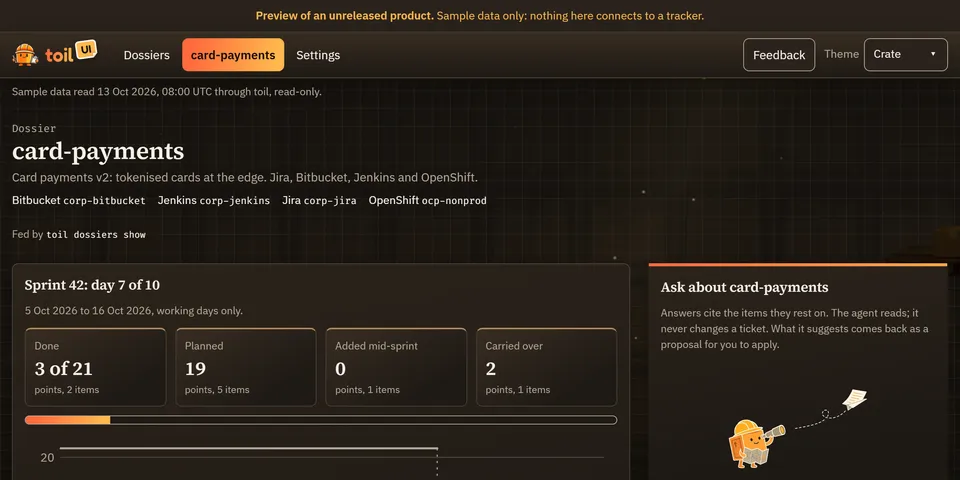 Open the preview
The same file reaches each reader its own way: toil dossiers show on the command
line; for an agent, the dossiers_show tool, the toil://dossiers/<name> resource and
meta.context on every call it makes; and a dashboard per dossier in Toil UI.
FAQ
- Do I need a dossier? No. Without one, commands take their inputs as flags or from the connection, exactly as before.
- Is it safe to commit one? Yes, that’s what it’s for. It holds no secret and no
writes, and can only choose among connections each reader already has. - Does toil contact the hosts in it? Never because a dossier named them. A host is compared with your connections’ hosts, nothing more.
- Several services, one product? One dossier, several
repos, and per-repo values where they differ ("repo": { "payments-core": "payments-core", "ledger": "ledger-svc" }). - One service in several products? Put a dossier in each, and pass
--dossierwhen the folder matches both. - Edits while
toil mcpruns? Dossiers are read on every call, so an edit applies from the next one.
Common mistakes
- A
hostwith no connection behind it.dossiers checkreportsDOSSIER_HOST_UNMATCHED; the call fails withNOT_CONFIGUREDand names the command to add one. It never falls back to the default connection. - Expecting reference data to fill a flag. Only an area’s context inputs fill flags. The warning when you add a key says which it is.
- Two dossiers for one folder. The call fails until you pass
--dossier. Merge them, or keep one in another repository. - A write through a teammate’s dossier.
WRITE_DISABLED, by design: adopt it withtoil dossiers import, or pass--connection. - A token in a remote. toil strips userinfo before storing a remote, and
dossiers checkfails a hand-edited file that still has one (DOSSIER_REMOTE_USERINFO). - Editing the JSON by hand and giving a key twice. JSON parsers keep the last one
quietly; toil reports
DOSSIER_DUPLICATE_KEYwith its path instead.
Commands at a glance
toil dossierslistList every dossier toil can see, where each lives, and any that are broken
toil dossiersshowPrint a dossier, and the connection, environment and inputs it gives each area
toil dossierscheckCheck a dossier locally: its schema, its connections and hosts, its remotes. Contacts no service.
toil dossierscontextShow which dossier a folder resolves to, and why
toil dossiersinitCreate a dossier in your own folder (~/.toil/dossiers)
toil dossiersadd-repoAdd a repository to a dossier, by its folder or its remote URL
toil dossierslinkAttach an area to a dossier: which connection it uses, and its keys
toil dossiersenvAdd an environment's resources for an area to a dossier
toil dossiersfieldName one of an area's fields in a dossier, so prompts use the name
toil dossiersexportWrite a dossier for sharing: into a repository's .toil/dossiers, or to one file
toil dossiersimportCopy a dossier into your own folder, adopting its bindings
toil dossiersunlinkCLI onlyRemove an area's section from a dossier, or one environment's
toil dossiersremoveCLI onlyDelete one of your own dossiers