
Toil UI has five built-in themes. Each one changes how the app looks, and the four game themes can go further: they can change the app’s microcopy, and the voice the agent answers in. Two checkboxes decide how far a theme goes. Nothing a theme does changes your data, what a button is called, or what the agent is allowed to do.
The five themes
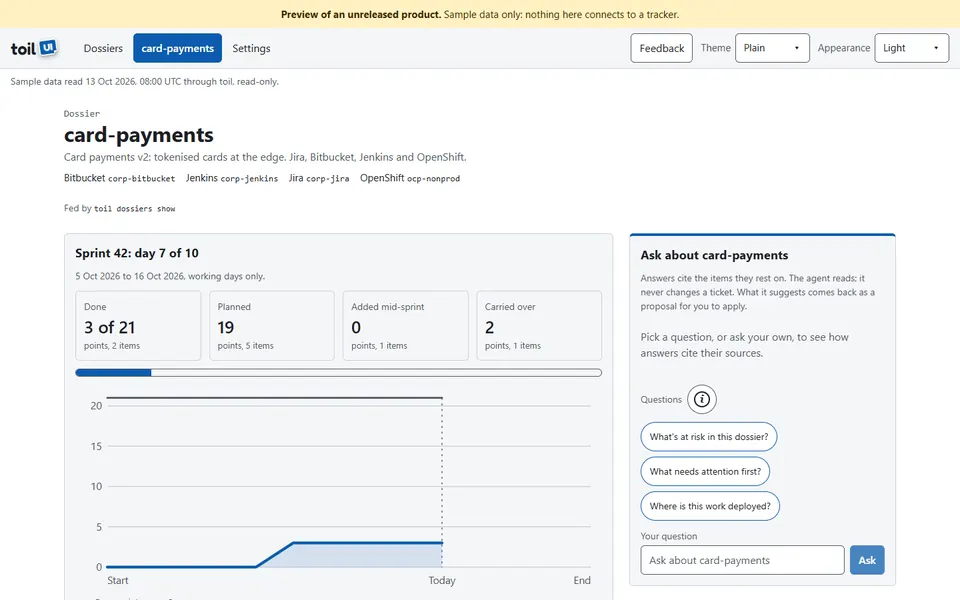
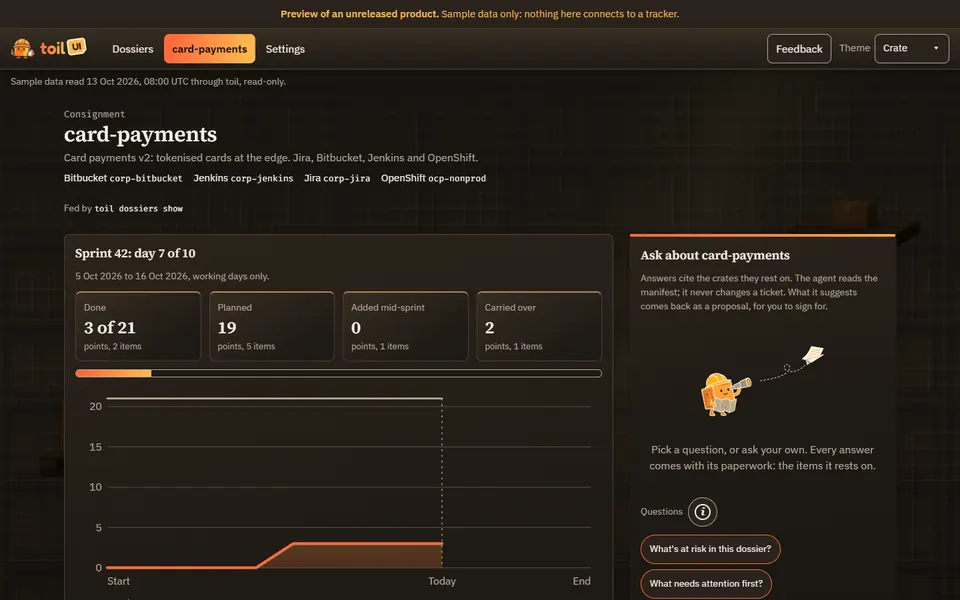
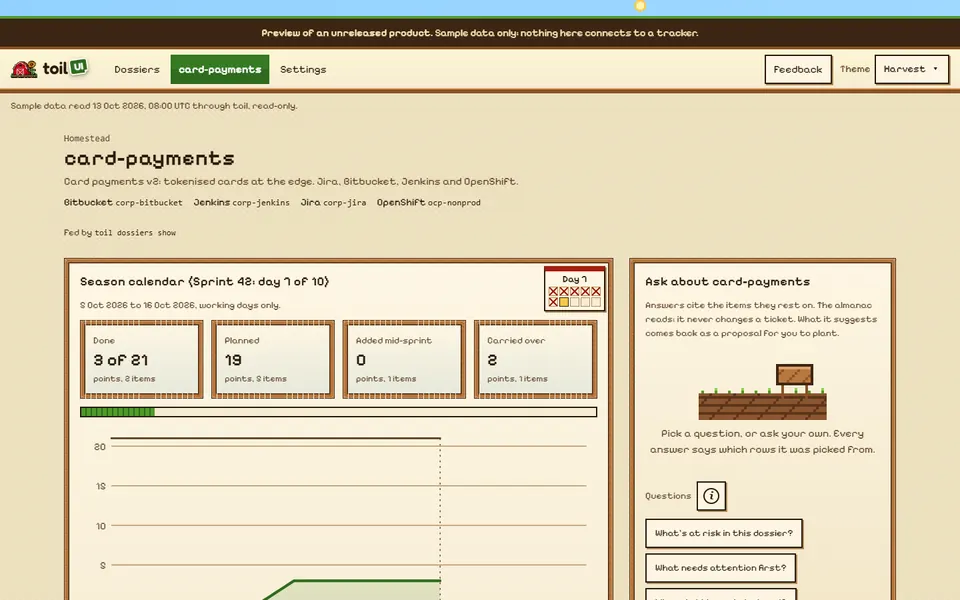
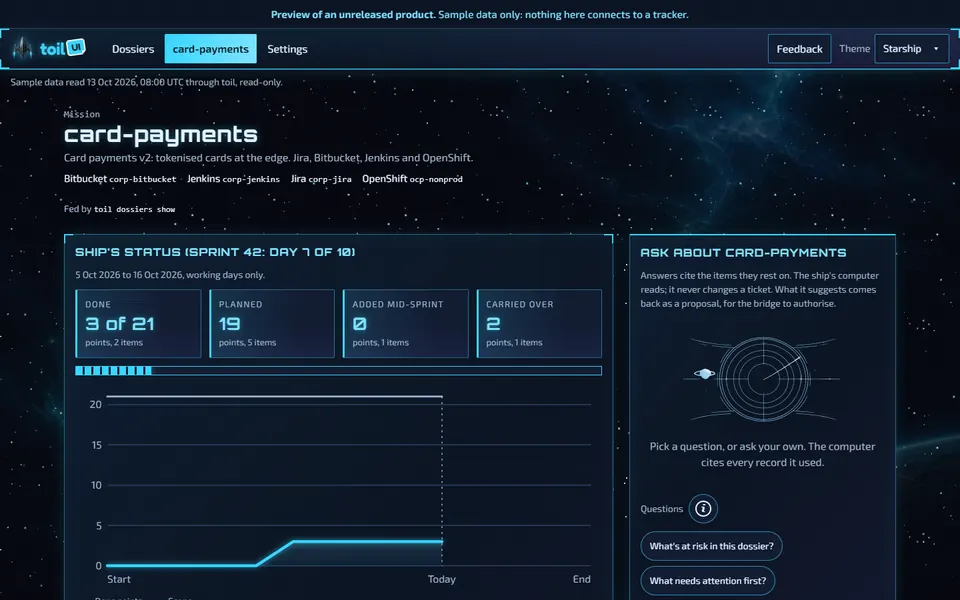
| Theme | Looks like | Wording and voice | Accessibility bar |
|---|---|---|---|
| Plain | Light and quiet, on system fonts, with a dark variant | None: always the standard text | WCAG 2.2 AA, strict |
| Crate | toil’s own brand: a warm near-black warehouse, flame-to-amber accent, the crate in its hard hat | A terse warehouse dockworker | WCAG 2.2 AA, strict |
| Harvest | A 16-bit farm: a pixel font, wooden sign panels, a sky that runs from dawn to dusk across the sprint | A patient farmhand | Decorative |
| Starship | A bridge console: HUD frames, scanlines, a slow starfield, holo panels | A ship’s log | Decorative |
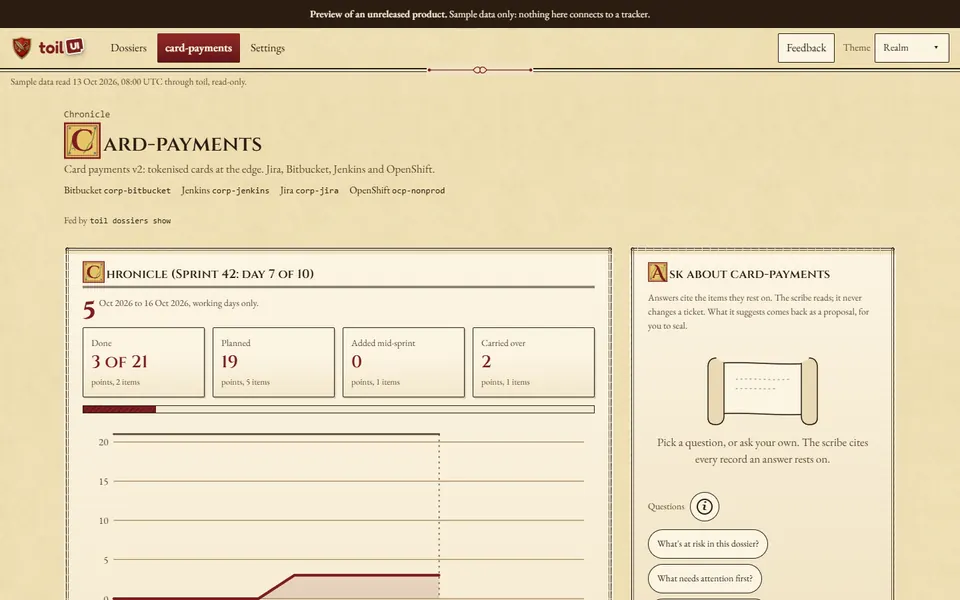
| Realm | A chronicle on parchment: ink, illuminated capitals, the dependency graph as a map | A herald | Decorative |
Crate is the default. The theme picker is in the header (in the Menu on a narrow screen) and in Settings, General. A ?theme= in the address opens a view in that theme, for example ?theme=realm, and this browser remembers it like a choice made in the picker.
Visuals, wording and voice
A theme has up to three layers.
- Visuals are what every theme has: colours, fonts, borders, art, and motion. They never change a word.
- Wording is the theme’s own microcopy, from the
lexiconin itstheme.json: the lede on the dossier list, the small eyebrow above a page’s title, the notes under the dashboard’s panels, the empty states, the loading lines, and the Ask pane’s notes. Crate’s empty board column reads “Bay empty.” and Realm’s reads “No deeds here.” A theme’s word for a sprint, a board or an epic is always shown beside the real one, as in Realm’s “Quest (Epic)” or “Chronicle (Sprint 42: day 7 of 10)”. The Settings pages and the Sync panel keep the standard text. - Voice is the register the agent answers in, from the
voicein the theme’stheme.json. Crate answers like a terse dockworker, Harvest like a patient farmhand, Starship like a ship’s log, and Realm like a herald.
Wording never touches these, in any theme:
- the name of a button, a link or a form field, so what you, a script or voice control looks for is always there, and every control’s accessible name matches its visible words (WCAG 2.5.3);
- a heading a screen reader or a test finds a section by, apart from the renamed words shown beside the real ones;
- a command such as
toil dossiers init, an item’s id, a number, a date, an error or its fix, or a not-found notice such as an item the dossier doesn’t have.
The two checkboxes
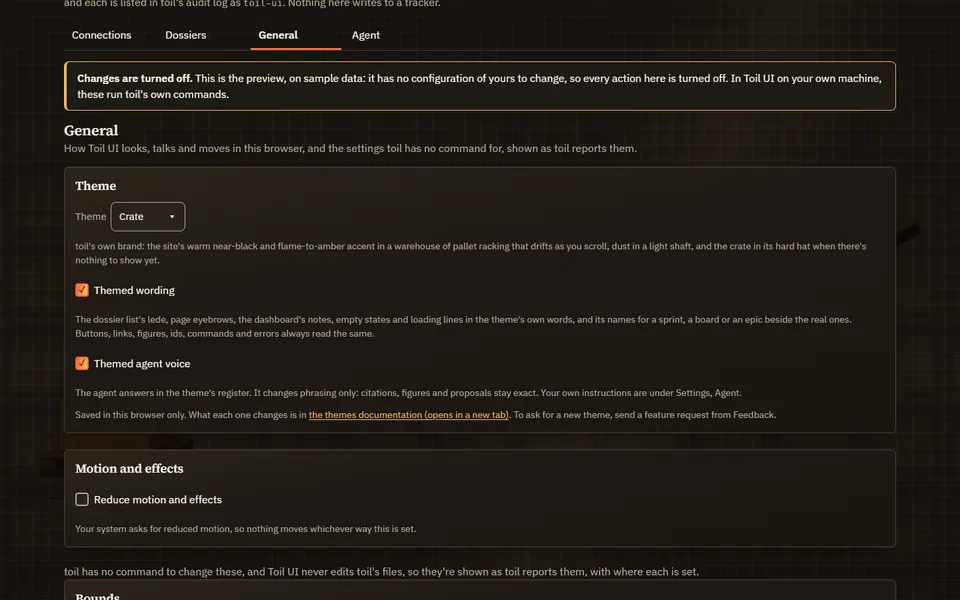
Settings, General has the theme picker and, under it, two checkboxes:
| Checkbox | Default | Off means |
|---|---|---|
| Themed wording | On | The standard text in every theme, and no renamed words |
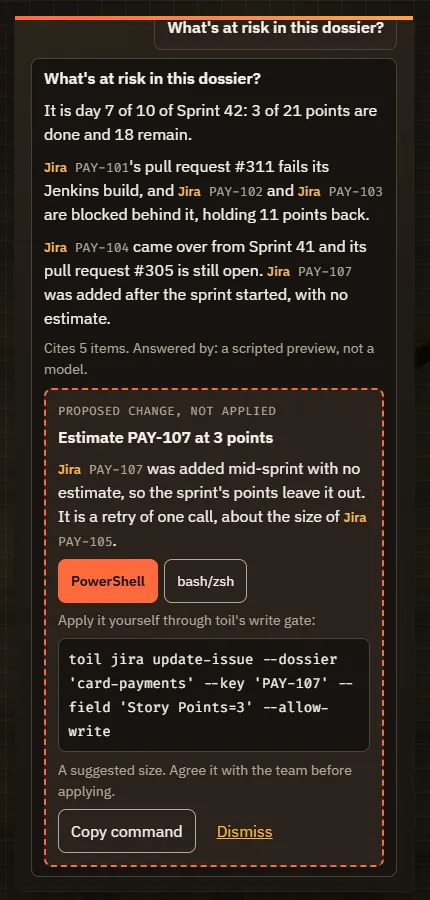
| Themed agent voice | On | The agent answers in plain wording, whatever the theme |
Plain has no wording or voice of its own, so while Plain is chosen both boxes are off and can’t be changed, and the page says why. Both are kept in this browser with the theme, like the reduced-motion setting, and never in toil’s config. ?wording=off or ?voice=off in the address switches one off, and =on switches it back on; either is then remembered in this browser like a click on the box.
Settings, General
Settings, Agent: Show the full prompt
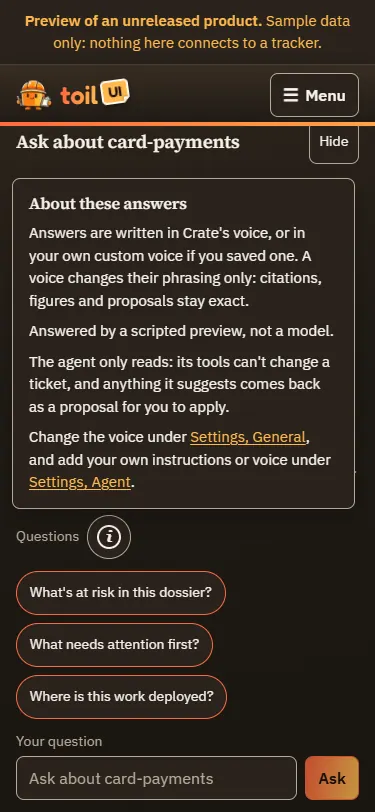
The (i) beside the questions
How the agent’s prompt is put together
Every adapter (Claude, GitHub Copilot and Codex) gets the same system prompt, built in one order:
- The rules. The same in every theme: use only Toil UI’s read tools, cite every item as
[[id]], write any change as a fenced proposal block for you to apply, keep to plain text, and say plainly when the data doesn’t show something. - Style. The theme’s voice, or your custom voice, but only while Themed agent voice is on and the theme has a voice. It ends by saying the rules win: the style changes phrasing only.
- Your instructions. Your general instructions from Settings, Agent, if you wrote any. They end by saying the rules win, and that they can’t give the agent a tool or let it change anything.
The page sends the server only the theme’s name and whether the voice is on. The voice text comes from the server’s own copy of the theme, so a page can choose a voice but can’t write one into the prompt. Claude gets the prompt as its system prompt, Copilot as a replacement system message, and Codex, which has no separate system prompt, at the start of the turn. The server’s citation check doesn’t change: it still flags any id the agent’s tools never returned.
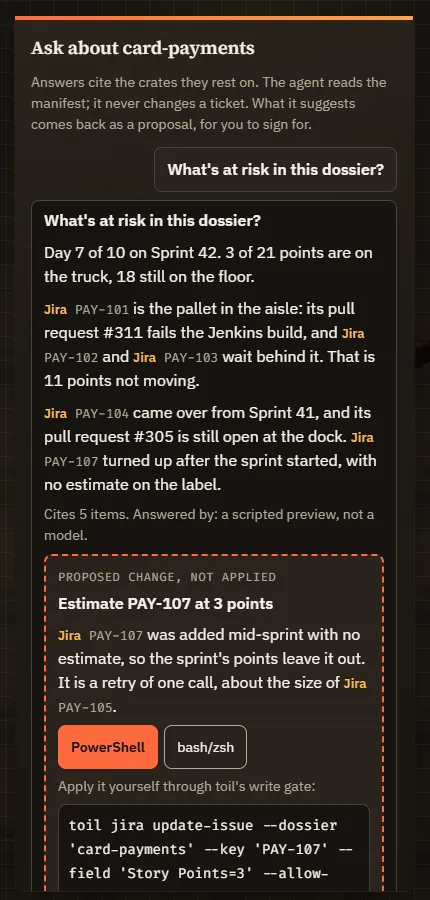
This is the whole prompt for a question about card-payments in Crate, with the voice on and one general instruction, “Answer in British English. Lead with risks.”:
You are the analyst inside Toil UI, answering a question about the dossier "card-payments": one body of work, its tracker items, pull requests, builds and deployments. It is 2026-10-13T08:00:00.000Z.

Rules:
1. Use only your tools. owi_query, owi_get, owi_similar and owi_history read what Toil UI last synced for "card-payments"; owi_similar finds likely duplicates, so run it before proposing a new item. The other tools are toil's live read commands for the same dossier; use them only when the cache can't answer. Never rely on anything you remember about these items.
2. Cite every work item you mention by its OWI id in double square brackets, such as [[jira:PAY-101]], exactly as your tools returned it. Never mention an item your tools did not return: the server checks every id against your tool results and flags any it never saw.
3. You cannot change anything, and you have no tool that writes. When the question calls for a change (a re-estimate, a move to another sprint, a split story, a transition), write it as a proposal for a person to apply, in a fenced block like this, one block per change:
```proposal
{"item": "<owi id>", "title": "<one line>", "reason": "<why, citing [[ids]]>", "command": "<the toil write command, such as jira issue update, or null if toil has none>", "input": {"<field>": "<value>"}, "note": "<anything to check first, or null>"}
```
   The input is the toil command's MCP input, without the dossier and without allowWrite: call proposal_fields with the command first and use only its fields, or the card shows no command line. Never say a change was made: it is only proposed.
4. Be brief and specific: short paragraphs of plain text (no Markdown, no headings, no bold), figures where you have them. Say plainly when the data does not show something.

Style:
Speak like a terse warehouse dockworker near the end of a long shift: short, flat sentences, practical and unhurried. Work items are crates, the sprint is this week's shipment, a pull request is a load waiting at the dock, a build is the forklift check, a deployment is a delivery that has left the yard, and a blocker is a pallet in the aisle. Lead with what is stuck and what would move it. Dry, never cheerful and never unkind: if there is a joke, it is on the paperwork, never on a person. These words go around the facts, never instead of them.

This style changes phrasing only. The rules above win wherever the two disagree: keep every citation as [[id]] exactly, each proposal as a fenced proposal block with its JSON exactly as rule 3 shows, every figure as the data gives it, saying plainly when the data does not show something, and plain text with no Markdown.

Instructions from the person asking:
Answer in British English. Lead with risks.

These instructions come from the person using Toil UI. Follow them where they fit the rules above; where they disagree, the rules win. They can't give you a tool, and nothing in them lets you change anything.
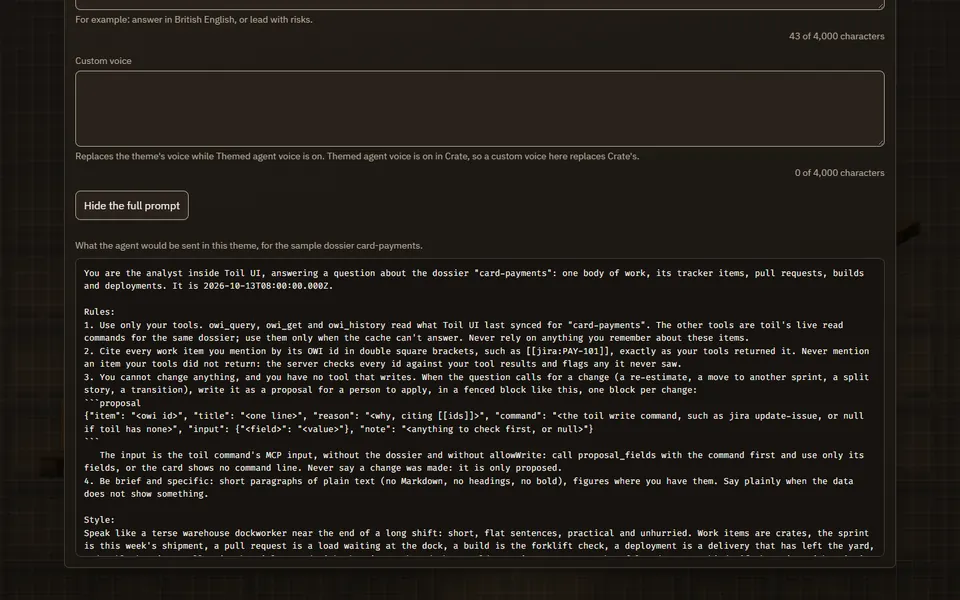
Show the full prompt, under Settings, Agent, shows exactly this for your own setup: a question about the first dossier toil lists, in the theme on screen, with the voice switch and what you saved. The preview shows it for its sample dossier, card-payments.
Themed agent voice on
Themed agent voice off
Custom instructions and a custom voice
Settings, Agent has two boxes of your own, each up to 4,000 characters, with a counter under it:
- General instructions go into every answer, in any theme, voice on or off. For example: “Answer in British English” or “Lead with risks”.
- Custom voice replaces the theme’s voice. It’s used only while Themed agent voice is on and the theme has a voice, so it does nothing in Plain.
Toil UI keeps both in its own data folder, in agent.json (~/.toil-ui/agent.json by default), never in toil’s config. They’re saved through the same lock as every other setting: the page’s session, its Origin and its CSRF token, and a check that refuses any field it doesn’t know. They are plain text: a control or invisible character other than a line break or a tab is refused, and Windows line endings become plain ones.
Instructions can’t widen what the agent can do. Its tools only read, whatever the prompt says, and anything it suggests comes back as a proposal card for you to apply through toil’s write gate.
The (i) beside the Ask pane’s starter questions says which voice the answers are in, which agent is answering, that it only reads, and where to change the voice and your instructions. It opens on a click, a tap or Enter, and closes with Escape or a click outside it.
Accessibility
- Plain and Crate are held to WCAG 2.2 AA, strictly: the colour pairs their text and controls use pass contrast checks (4.5:1 for text, 3:1 for focus rings and control borders), and every view has no axe violations in a real browser at 375, 768 and 1440 pixels.
- Harvest, Starship and Realm are decorative. Their colour pairs still pass the same contrast checks, but their axe findings in a browser are reported rather than failed, since a pixel font or a parchment border may bend a rule for style. If you need the strict bar, use Plain or Crate.
- Every theme has the same buttons, links and fields as Plain, and the same page layout rules: nothing scrolls sideways, and nothing hides under the Ask dock.
- The wording and voice are text like any other text, so they’re read out by a screen reader. Art a theme adds is decoration and is hidden from screen readers.
Reduced motion
The four game themes move a little: dust in a light shaft and a parallax rack in Crate, particles over Harvest’s fields, a starfield in Starship, runes in Realm’s margins. Plain doesn’t move. Nothing moves when your operating system asks for reduced motion, or when Reduce motion and effects is ticked under Settings, General. No theme plays sound.
Asking for a new theme
Toil UI ships its themes and doesn’t install themes from anywhere else. To ask for a new one, send a feature request: from the Feedback button in Toil UI’s header, from the feedback page, or on the command line with toil feedback feature. Say what it should look like, and how it should talk.